


Olive Garden Italian Kitchen
3.55.51K Reviews
App Specs
- Version
- 7.70.0
- Updated On
- License
- Free
- Downloads
- 1,000,000+
- Developer
- Darden Restaurants, Inc.
- Categories
- Food & Drink
- Platform
- Android, iOS
Screenshots
 Analysis by AppCompare
If you’re a fan of Italian cuisine and have ever wished to bring the magic of Olive Garden right to your doorstep, then you might want to check out the Olive Garden Italian Kitchen app. I recently downloaded it to see if it could satisfy my pasta cravings and streamline my dining experience. Let me take you through my journey with this app.
When a restaurant app becomes useful
I find this kind of app most useful when I already know I want Olive Garden and need to decide how to get the meal: eat at a nearby restaurant, arrange a pickup, or place a ToGo order. It is less helpful if I am still choosing among several restaurants, because it is built around one chain rather than comparing menus across the neighborhood. That distinction matters: it can shorten the route from craving to order, but it is not a general dining guide.
A realistic use is planning a family meal after work. I can check the restaurant option before everyone settles on a dish, then use the app’s ordering path if ToGo suits the evening. For a group, I would make the choices together before submitting anything. That simple step helps avoid the familiar problem of placing an order and then discovering someone wanted a different side or had a question about an item. It also makes the app more of a coordination aid than just a menu on a phone.
Getting Started with the App
First things first, downloading the Olive Garden Italian Kitchen app was a breeze. Available on both Android and iOS, you can find it in the Google Play Store or Apple’s App Store. Once installed, the user interface greets you with a sleek and modern design that’s intuitive and easy to navigate. It’s like having a digital menu in your pocket, minus the fancy paper and elegant fonts.
Exploring the Menu
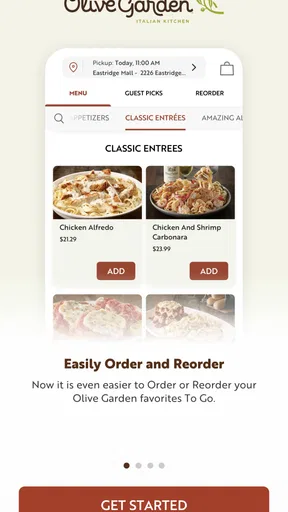
The main attraction of this app is, of course, the menu. With just a few taps, you can explore a variety of dishes from appetizers to desserts. The app provides detailed descriptions, so you know exactly what you’re getting. I was impressed by the high-quality images of each dish, which made my mouth water just by scrolling through them. If you’re indecisive like me, the popular items section can help guide your choice.
Ordering Made Easy
Ordering through the app is straightforward. You can customize your meal with ease, whether you’re adding extra cheese to your pasta or opting for gluten-free options. Once you’ve made your selection, you can choose between delivery or pickup. The app provides real-time updates on your order status, so you’re never left wondering when your food will arrive. It’s a seamless experience that makes dining out, while staying in, incredibly convenient.
Making the order less error-prone
Even when the ordering flow feels simple, I treat the final review of the basket as an important step rather than a formality. Read each dish and its selected options again before confirming, especially when several people are sharing the order. A customization that sounds minor can change what arrives, and catching a mismatch on screen is easier than sorting it out after pickup. If an item or choice is unclear, I would pause and check with the restaurant instead of assuming the app covers every dietary question.
Worth Reading Before You Choose

EA SPORTS FC Mobile 26 Is a Bigger Football Game, but It Takes Time

Flipboard Shows What News Apps Must Do Beyond the Feed

Switching to Android Auto Means Rethinking Your Driving Routine

Google Calendar Makes a Crowded Week Easier to Manage

Ludo King Makes the Most of the Minutes Between Plans

Baby Panda World Brings Quick Play to Modern Phones, but Its Game Library Feels Busy
For a busy evening, I would also decide first whether pickup or delivery is the better fit, then keep the order consistent with that plan. If the restaurant choice or order details look wrong, backing out to review them is safer than tapping through quickly. The app is a convenient ordering channel, but it cannot remove the need to check that the selected location and meal are the ones I intend to use.
Where setup and checkout can snag
The app is free, and Darden Restaurants, Inc. is the developer behind it. It is rated for Everyone, has more than a million installs, and its average rating is 3.6 from around 17,000 ratings, with about 5,500 written reviews. Those figures suggest that plenty of diners use it, while the middling average is a reminder that a smooth experience is not guaranteed on every phone or for every order.
On Android, the current version is 7.40.0 and the minimum operating system is 11. If an install or update is not available, checking that the device meets that requirement is a sensible first move. I would also check that the app is updated through the relevant app store and that the phone has a working connection before retrying an order. These basic checks do not fix a restaurant-side delay, but they can rule out simple device and connectivity trouble.
Loyalty Program and Exclusive Offers
One of the standout features of the app is the loyalty program. Every time you order through the app, you earn points that can be redeemed for future discounts. It’s a great way to save some bucks while enjoying your favorite dishes. Plus, the app regularly offers exclusive deals and promotions that you won’t want to miss. I found myself checking the app regularly just to see what new offers were available.
Checking the details before counting on a deal
I would treat an offer as a reason to compare the final order, not as a reason to rush through checkout. Confirm that the deal appears where expected and that the selected meal still suits the group; a discount is only useful if it applies to what you actually want. If something does not appear, I would reread the offer details and review the order rather than assuming that every promotion works with every choice.
The same practical approach applies to loyalty rewards. They can make repeat visits more rewarding, but they are most valuable to diners who already choose Olive Garden regularly. If you only visit occasionally, I would not make the rewards the main reason to install the app. Think of them as a possible extra attached to a restaurant you like, rather than a substitute for comparing the meal and convenience with other options.
The Little Extras
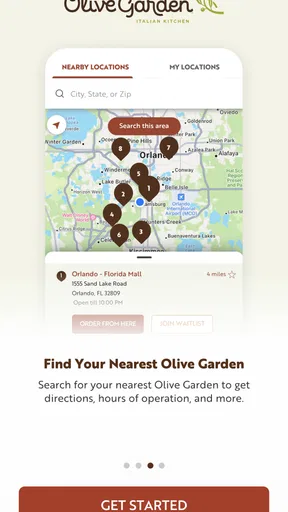
Besides ordering, the app includes a nifty restaurant locator feature. Whether you’re at home or traveling, you can easily find the nearest Olive Garden. The app also lets you make reservations, which is super handy if you’re planning a special night out. And for those who love to cook, the app occasionally features recipes so you can try your hand at recreating your favorite Olive Garden dishes at home.
When the app is not the cause
A location result or ordering hiccup does not always point to a problem with the app itself. A restaurant may be inconvenient for the route, and the phone’s connection can interrupt a step. I would check the location shown, confirm the device is online, and try again before repeating an order. If the screen remains unclear or the restaurant cannot fulfil the plan, contacting that restaurant is more useful than repeatedly submitting the same request.
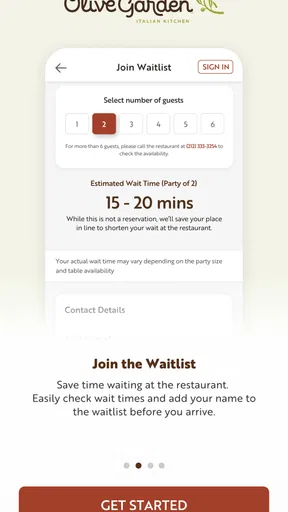
For a wait at a restaurant, the wait-list option is a different use from ordering ahead: it helps with the visit itself rather than replacing a ToGo order. I would choose the route that fits the occasion and verify the selected restaurant before relying on it. If a particular location or timing is central to the plan, a direct check with the restaurant is the safer fallback than assuming every location handles the same situation identically.
How it compares with other ways to order
Compared with a general food-delivery app, this one keeps the experience centered on Olive Garden and combines restaurant-finding and dining-related tasks with ordering. That focus is a strength if I have already settled on the chain; I do not have to sift through unrelated restaurants to get to its menu. A broader service is better when I want to compare several nearby cuisines, delivery options, or restaurants in one place. The trade-off is straightforward: focused convenience here, wider choice elsewhere.
It also sits between calling the restaurant and browsing a menu in person. The app lets me look over choices at my own pace and prepare an order without talking through every item, while calling can be preferable when I have a complicated question or need a person to clarify a detail. For a dine-in visit, the locator and wait-list tools may be more relevant than mobile ordering. I would not use the app simply because it exists; I would choose the function that solves the immediate problem.
Who will get the most from it
I would recommend it to people who visit Olive Garden often, families coordinating a ToGo meal, and diners who like checking the menu before leaving home. It can also help someone traveling who wants to locate a restaurant from the chain rather than search manually. The strongest reason to keep it installed is recurring convenience: when the same restaurant is already part of your routine, having its ordering and visit tools together can save a few steps.
Someone who rarely eats there, prefers exploring independent restaurants, or needs detailed personal guidance about ingredients may be better served by other options or by contacting the restaurant directly. Likewise, if the main goal is comparing delivery choices across multiple businesses, a multi-restaurant platform offers a wider view. The app is not a replacement for every food-service tool; its value depends on wanting Olive Garden specifically.
My Final Thoughts
Overall, the Olive Garden Italian Kitchen app is a must-have for any fan of the restaurant. It combines the convenience of mobile ordering with the deliciousness of Olive Garden’s menu, all wrapped up in an easy-to-use package. Whether you’re craving a quick lunch, planning a family dinner, or just want to explore new Italian dishes, this app has got you covered. With its loyalty perks and exclusive deals, it’s like having a little piece of Italy in your pocket.
So, the next time you’re dreaming of a hearty bowl of pasta or a fresh salad, give the app a whirl. It might just become your new favorite way to enjoy Olive Garden!
Pros
- User-friendly interface with intuitive navigation.
- Extensive menu with detailed descriptions.
- Easy online ordering and reservation system.
- Loyalty program offers great rewards.
- Regular updates with new features and improvements.
Cons
- Limited customization options for orders.
- Occasional app crashes during peak hours.
- No offline mode for browsing menus.
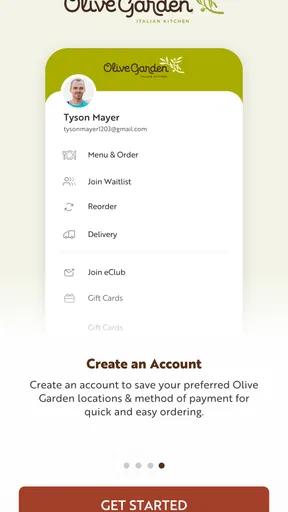
- Requires account creation for full access.
- Limited payment options available.
FAQs for Olive Garden Italian Kitchen
What is Olive Garden Italian Kitchen app used for?
The Olive Garden Italian Kitchen app is designed to enhance your dining experience by providing easy access to the menu, allowing you to place to-go orders, and even join the waitlist for a table. Additionally, it offers exclusive promotions and rewards for frequent diners, making it a must-have for Olive Garden enthusiasts.
Is the Olive Garden app available for both Android and iOS devices?
Yes, the Olive Garden Italian Kitchen app is available for download on both Android and iOS platforms. You can easily find it on Google Play Store for Android devices and the Apple App Store for iOS devices, ensuring that you have access no matter what device you use.
How does the Olive Garden rewards program work through the app?
The app includes a rewards program where you can earn points for every purchase you make. These points can be redeemed for discounts or free items on future visits. The app keeps track of your points, making it easy to manage your rewards and take advantage of special offers.
Can I customize my order through the Olive Garden app?
Yes, the app allows you to customize your orders according to your preferences. Whether you want to add extra toppings or modify ingredients to suit dietary restrictions, the app provides a user-friendly interface to ensure your meal is prepared exactly how you like it.
Does the Olive Garden app require an internet connection to function?
While browsing the menu and exploring the app features can be done offline, an internet connection is required for placing orders, joining waitlists, and accessing the latest promotions. A stable connection ensures that you can fully utilize all the features the app offers.


